Walk into almost any broadcaster’s tape vault and you’ll find the same thing: shelves of Betacam and U-matic cassettes holding programmes nobody has watched in twenty years. Some of it is gold. A 1990s cricket final, an interview with a director who has since passed away, a regional drama a streamer would happily license. The catch? Buyers now ask for HD as a minimum, sometimes 4K, and SD masters often don’t meet their delivery specs.
That’s where an SD to HD upconversion workflow comes in. Outside broadcast circles it’s usually called video upscaling, and it’s tempting to think of it as a resize. It isn’t. Push a 576i picture straight to 1080 and you get soft edges, stair-stepped diagonals and a faint shimmer on anything that moves. A clean result takes a sequence of decisions, each made by someone who has actually looked at the footage.
Why Broadcast SD to HD Upconversion Is Back on the Agenda
For years, archives were treated as a storage bill. That view is shifting. In NewscastStudio’s 2026 outlook, Fred Petitpont, co-founder and CTO of Moments Lab, argues that organisations deploying production-ready AI, rather than pilot programmes, will unlock new revenue from archive monetisation. The tools are arriving too. Telestream and NVIDIA announced Vantage Super Resolution, an AI upscaling option for Telestream Vantage that converts legacy SD and HD content into HD, 4K and UHD deliverables. It was previewed at IBC2026, with release planned for Q4 2026.
So broadcast SD to HD upconversion is no longer a once-a-decade job. It’s becoming routine, which makes doing it carefully more important, not less. A badly upconverted programme can fail QC, and a buyer who receives one rarely comes back for the rest of the catalogue.
Inside a Professional SD to HD Upconversion Workflow
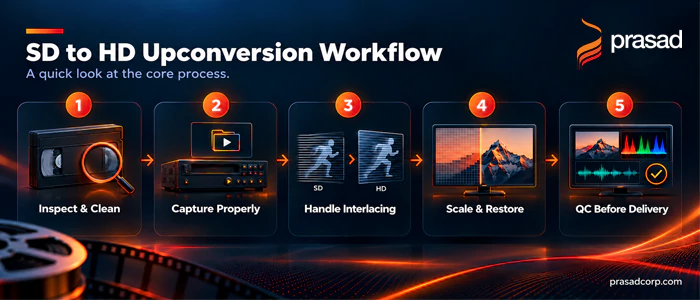
Every project is a little different, but the work usually moves through five stages.
- Inspect and clean the tape: Each tape is visually checked for fungus, sticky binder and physical damage. It is then cleaned by hand and on RTI cleaning machines, and sticky tapes are baked before playback. A clean playback pass does more for final quality than any software later on. Our tape digitization team handles formats including Betacam, U-matic, DV, DVCAM, DVCPRO and VHS. The inspection also tells us how far the material can go: HD, 2K or 4K.
- Capture properly: Tapes are played on specialised, well-maintained decks through high-quality analogue-to-digital converters, and captured to uncompressed or lightly compressed master files. Compress heavily at this stage and you throw away detail the scaler needs.
- Handle interlacing correctly: Most SD video is interlaced, so it needs careful deinterlacing before scaling. Programmes that originated on film are different: NTSC transfers usually carry 3:2 pulldown, which should be reversed (inverse telecine) to recover the original frames rather than deinterlaced. Get this wrong and combing or judder shows up twice as large in HD, and larger still at 4K.
- Upscale, frame and restore: This is the part people picture when they hear video upscaling or legacy SD content upscaling. Depending on the material, scaling may use conventional, motion-compensated or AI-assisted methods; no single method suits every clip. The target resolution, whether HD, 2K or 4K, is chosen based on the quality of the source. An operator also decides what to do with 4:3 pictures: pillarbox, crop or reframe. Dropouts and noise are cleaned up where needed. The picture is converted from the SD colour standard (Rec. 601) to the HD standard (Rec. 709), which is a technical conversion. Colour grading is a separate, creative step, used only when faded or uneven colour needs correcting.
- Check it before delivery: QC covers audio/video sync, frame drops, visual artefacts and signal dropouts. We’d also recommend checking video levels, the file wrapper and the metadata against the broadcaster’s or buyer’s delivery spec. Masters can be delivered in formats such as ProRes, MXF or H.264 MP4.
Beyond HD: Video Upscaling to 2K, 4K and 8K
HD is the floor, not the ceiling. Streamers and OTT platforms increasingly ask for 4K UHD, and cinema or festival screenings may call for a 2K or 4K DCP. The right target depends on what the source actually holds.
| Source | Realistic target | Route |
|---|---|---|
| SD tape (480i / 576i) | HD, 2K or 4K, depending on source quality | SD to HD upconversion; 2K/4K upscaling where the source holds enough detail |
| HD master (1920×1080) | 2K (2048×1080) or 4K | HD to 2K conversion for cinema; HD to 4K upscaling for streaming |
| 2K film scan or DI | 4K | 2K to 4K upscaling, or rescan if the film survives |
| Original film elements (35mm, 16mm) | 4K, up to 8K | New film scan, not upscaling |
- SD to 2K and 4K: How far an SD programme can go depends on the quality of the source. A well-preserved broadcast master such as Digital Betacam or Betacam SP can often be taken to 2K or 4K with clean, stable results. A worn VHS or multi-generation copy may be best kept at HD. We assess each tape before recommending a target, so you know what your material can realistically support.
- HD to 2K and 2K to 4K: These are smaller steps and usually give strong results, because the source already carries much of the detail. HD to 2K conversion and 2K to 4K upscaling are common for programmes going to cinema release, festivals or premium streaming tiers.
- Film content up to 8K: For anything that originated on film, the real detail lives on the negative, not on the tape. 35mm film can carry detail well beyond HD, which is why 8K film scanning is the better path for high-value titles when the film elements survive. Upscaling an SD tape transfer to 8K adds pixels, not picture. Rescanning the film recovers detail the tape never recorded.
Where Legacy SD Content Upscaling Usually Goes Wrong
A common challenge in SD to HD upconversion is applying the same processing settings to different types of footage. Dark scenes may need careful noise reduction, while fast-moving footage may require appropriate motion handling and deinterlacing, depending on the source. Reviewing each clip and adjusting the workflow to its condition helps preserve image quality and avoid unwanted artefacts.
AI video upscaling brings a different problem: these tools are very good at producing detail, including detail that was never there. The further you push the resolution, from HD to 4K and beyond, the more the scaler has to invent. On a drama, that might be acceptable. On news footage, or anything with historical weight, a sharpened face or an invented texture quietly changes the record.
That is why many traditional archives remain cautious about AI. Their concern is that any intervention could compromise the integrity and authenticity of the original. It’s a fair concern, and a useful test follows from it: if a change can’t be defended as faithful to the source, leave it out.
What to Ask Before Choosing Video Upscaling Services
Before you send a single tape to a professional video restoration service, ask a few blunt questions:
- Do you clean and inspect tapes before playback, or go straight to capture?
- Which deinterlacing and scaling methods do you use, and can I see before/after clips of similar material?
- What will you do with 4:3 content?
- If I need 4K, will you tell me honestly what the source can support?
- Is QC done against my delivery spec?
- Will I also receive the untouched SD capture?
Vague answers to any of these are a warning sign.
One more thing. If a programme was shot on film and the original film elements still exist, upconverting the tape may not be the best route. A new film scan can produce a better HD, 4K or even 8K master. How much better depends on which element survives (negative, interpositive or print), its condition and the quality of the scan, so it’s worth testing both before deciding.
Getting Started
Prasad introduced digitisation services in the early 1980s and brings three decades of tape-handling experience to every project, and our SD to HD conversion services and 4K upscaling services build on that work. If you have a library and aren’t sure what it will look like in HD, 2K or 4K, talk to our team about your material. If you’re also planning HDR deliverables, our piece on why SDR to HDR conversion matters covers the next step, and our HDR colour grading team can take it from there.